For DJs who take their crate seriously

Discover better music.
Build better sets.
DJ with confidence.

Mastermind is the all-in-one music platform built for modern DJs. From discovering new artists and buying tracks, to intelligent library management, effortless preparation, and seamless export to your hardware — every step is faster, smarter, and more enjoyable.

Automatic BPM and key analysis, intelligent organisation, customised colour waveforms, and powerful preparation tools help you spend less time managing your music — and more time creating unforgettable sets.

Web app free today · No card required · Desktop app coming very soon

Hands on a glowing holographic brain above a DJ deck — the Mastermind vision
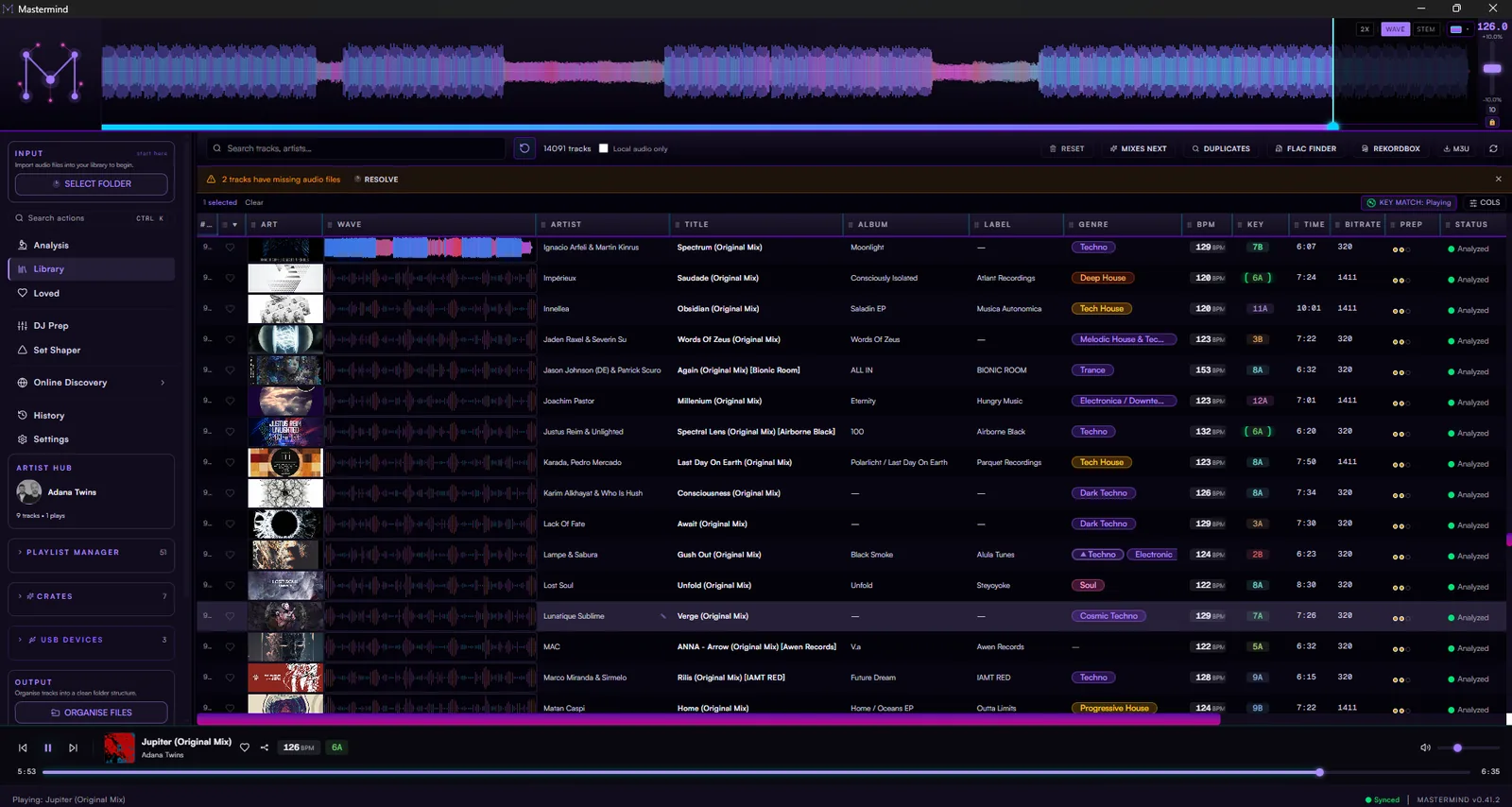
The Mastermind library — custom colour waveforms, artwork and a fully analysed crate

From discovery to the decks — one flow

01DiscoverNew artists & tracks
02ImportYour folders & platforms
03AnalyseBPM, key, energy & artwork
04OrganiseCrates, tags & clean files
05PrepAuto-cues, grids & waveforms
06ExportTo every deck you own
See the music

Colour waveforms that read like a map

Bass, mids and highs each get their own colour, so a track’s whole story — the intro, the build, the drop, the breakdown — is visible before you ever press play. Flip to STEM view and watch the vocal, drums and bassline split into separate layers.

  • Three-band frequency colouring
  • Stem view — isolate vocals, drums & bass
  • HD zoom right down to the beat
Mastermind waveform in stem mode showing vocals, drums, bass and other as separate colours
Prep in seconds

Auto-cues that land on the moments that matter

Smart Analysis reads each track’s phrasing — the 8, 16 and 32-bar blocks a DJ actually mixes around — and drops cue points at the mix-in, the drop and the switch-up automatically. The beat grid is one keystroke to check and two to fix, so even live recordings grid up fast.

  • Phrase-aware auto cue points, 8 pads filled
  • One-key beat-grid adjust — tap the downbeat, done
  • Cue roles & colours that follow you to the booth
Auto-placed phrase cues on eight hot-cue pads
Trust your numbers

BPM and key you can bet a set on

Multiple detectors analyse every track and cross-check each other, so the tempo and key on the label are the tempo and key in the speakers. Hover any value and it tells you exactly where it came from — no more half-time surprises three tracks deep.

  • Cross-validated BPM & key detection
  • Energy scoring for reading the room
  • Every value shows its source on hover
The Mastermind analysis page with a queue of tracks showing BPM, key and energy
A library that stays in order

Metadata that fixes itself

Mastermind enriches every track from the sources that matter — genre, label, release year and full-size album art pulled in automatically. Messy filenames get verified and cleaned to a consistent shape, duplicates get flagged with the best copy recommended, and every change is reversible.

  • Auto-enriched genre, label & album art
  • Filename verify & clean — evidence-backed, reversible
  • Duplicate finder with a recommended keep
The metadata cleanup wizard
Find it in three clicks

Filter like you think, crate in seconds

Search by anything — BPM range, key, energy, genre, label — and the table narrows live as you type. Save any filter as a Smart Crate and it keeps filling itself as your library grows: “peak-time techno, 128–132, high energy” is a crate that’s never out of date.

  • Instant search across your whole library
  • Smart Crates that fill themselves by rule
  • Playlists built in seconds, not evenings
Live search filtering the track table
Your music, your way

Customise everything you look at

Paint your waveforms your own colours in the Palette Studio — band by band, with live preview. Every track table is fully resizable: drag columns, pick which ones show, set row heights, and each page remembers its own layout. Set it up once and the whole app looks the way you think.

  • Custom waveform colours — full Palette Studio
  • Resizable track table with saved layouts per page
  • Key notation, tempo range & defaults that stick
The Palette Studio editing custom waveform colours
Know your artists

An Artist Hub for everyone you play

Every artist in your crate gets a page — your history with them, their full discography, and a mix-compatibility read against your whole library. One glance tells you whether their sound slots into your sets or stretches them.

  • Photo, bio, releases & your play history
  • Mix-compatibility scored against your library
  • Links out to Beatport, Discogs & Spotify
The Artist Hub overview with a photo header, bio and headline stats
Pull tracks apart

Get more out of your tracks

Every track splits into its stems — vocals, drums, bass and instruments — right on your machine. Solo the vocal to learn a hook, kill the drums to hear the musicality, or export any stem as its own audio file: grab an acapella in one click and take it to the studio.

  • On-device stem separation — no upload
  • Solo or mute vocals, drums, bass & more
  • Stem exporter — acapellas & instrumentals as files
STEM mode with vocal, drum and bass solo toggles
Mix in key

Harmonic mixing, the way you read it

Camelot, classical, or both side-by-side — pick once and every key in the app follows. Compatible keys glow against whatever’s playing, so the harmonic blend is always the obvious next move.

  • Camelot / classical / both — your call
  • Key-match glow against the playing track
  • Energy-step suggestions for the next tune
The key-notation menu offering Camelot, Classical and Both display modes
Play it anywhere

Export straight to your gear

Your cues, grids, colours and playlists travel with you — rekordbox XML, Serato tag write-back, Traktor NML, or a USB stick your CDJs read natively. Prep once in Mastermind and it shows up in the booth exactly how you left it.

  • rekordbox, Serato & Traktor hand-offs
  • Direct USB / CDJ export
  • Cues, grids & loved status carry over
The export menu with rekordbox XML, Traktor and Serato options
All this and more — Coming Soon

The complete DJ music ecosystem.

The Mastermind desktop app brings the whole workflow to your machine — colour waveforms, stem separation, auto-cues, harmonic prep and USB export for your CDJs, all running locally on your own library.

It's not ready to download just yet — but it's very close. While you wait, the web app is free: start exploring, discover new music and build your library today. Everything syncs straight into the desktop app the day it lands.

Launching on Windows, macOS and Linux.

  • On-device analysis
  • Auto-cue & beat-grid
  • Stem waveforms
  • USB / CDJ export

Be first through the door — get the launch email.

No spam — one email when it launches. Unsubscribe anytime.

See everything in the desktop app
The Export to USB wizard picking a drive

Built to send money back to artists

Mastermind points you to where your money actually reaches the people who made the music. Buy on Bandcamp and Beatport, not just stream — one link from every track.

Ready to get your library in order?

Start free on the web today, and be ready the day the desktop app drops.

Mastermind Music | The Complete DJ Music Ecosystem